SectionOverview
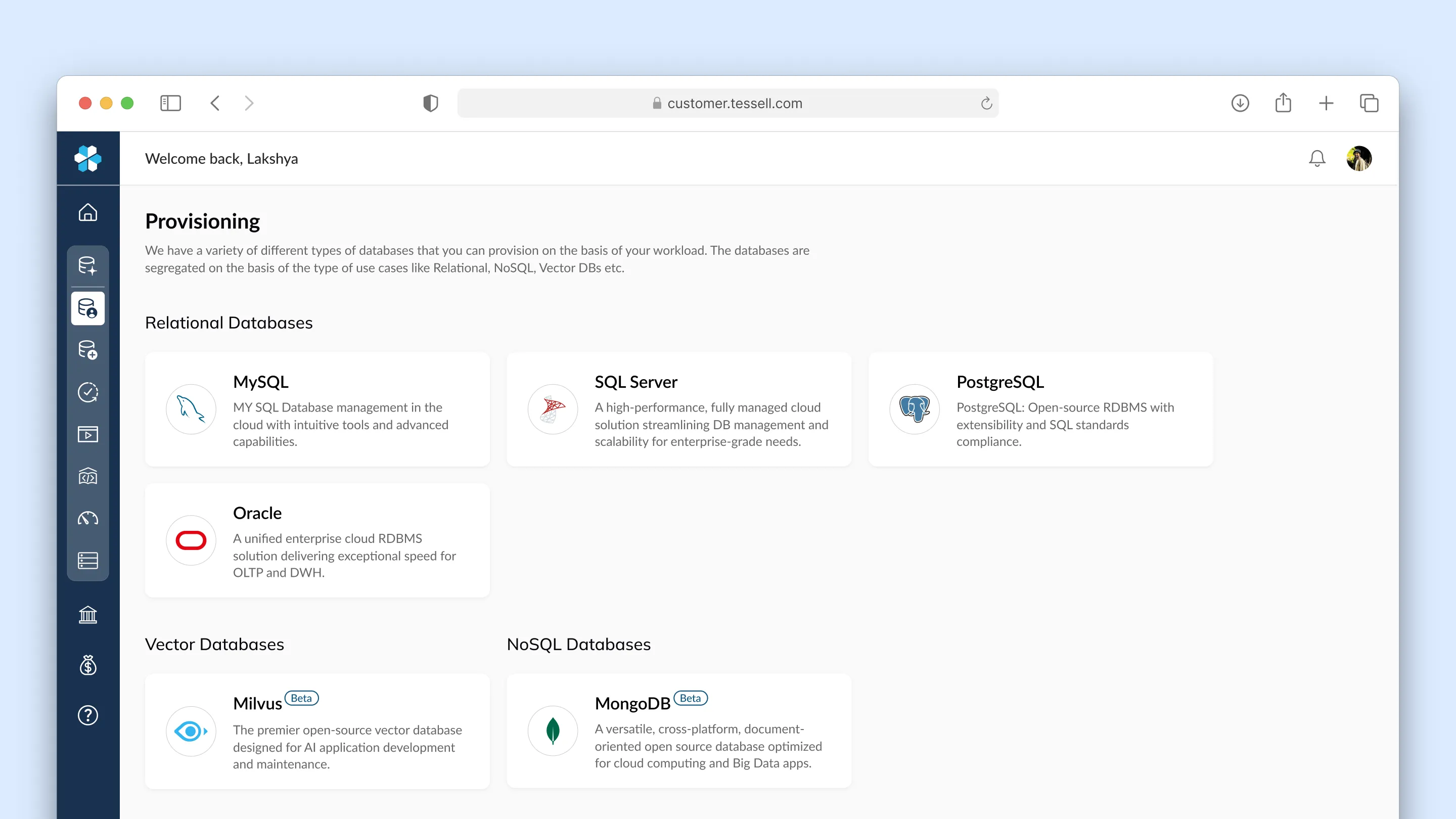
This work is under NDA. What follows is a high-level view of the problem, my role and how the project unfolded. Customer names, internal data and detailed screens are left out, and visuals are simplified. I’m happy to walk through the full story in conversation.
01B2B SaaS · Cloud Database Management · ~15 min read
Deciding when a database is allowed to go down.
I introduced Tessell’s first maintenance-window model in 2023 and owned its evolution for three years, as the platform grew from database-level changes to customer-managed servers, security updates and maintenance across many servers at once.
- Role
- Sole designer on maintenance, as Product Designer and then Senior Product Designer
- Timeline
- Aug 2023 – Sep 2026
- Team
- Product, engineering, the support team, customer success, and one designer I mentored
- Scope
- Product definition, research, systems and interaction design, validation, delivery
01 · Overview
Designing how downtime worked as the platform grew.
Tessell runs databases for large enterprises. Every database needs work that takes it offline for a while, and for a company running its business on that database, unplanned downtime is lost money.
I owned how that downtime was planned for three years. The first model was right for the product in 2023. Then the platform changed around it, and the model had to change with it. This is the story of knowing which was which.
02 · Context
Context · 2023
Downtime was unavoidable. Surprise downtime wasn’t.
In 2023, customers worked with Tessell at the level of a database service. Some changes to a database needed downtime, and they took effect the moment someone applied them.
So the people depending on that database often found out it was going down too late to do anything about it.
Who decides when downtime happens, and how does everyone affected find out?
03 · What changed
One setting became a product area.
3 yrs
Owning the maintenance experience as the platform changed underneath it.
3
Enterprise customers who validated the major concepts before build.
4
Releases, each widening what could be maintained.
| Before | After |
|---|---|
| Database changes applied immediately | Downtime planned into an agreed window |
| Maintenance only at database level | Maintenance at database and server level |
| Updates coordinated by hand through the support team | Customers schedule their own updates |
| Maintenance spread across individual resources | One place to see scheduled work |
| Admins rebuilding server groups every cycle | Fleets with one recurring schedule |
04 · 2023
2023 · The first maintenance window
The right model for the product that existed.
The ask was “Give database services a maintenance window.”
Servers weren’t visible to customers yet, and there was no one whose job was to run them. Downtime lived at the database-service level, so a window on the database service was the right abstraction, and I designed it that way.
The bigger decision was the pattern around it. Changes that caused downtime used to run the moment you clicked apply. I turned apply into a question, “when?”, with the agreed window as the safe default, so owners learned one pattern for every kind of change.
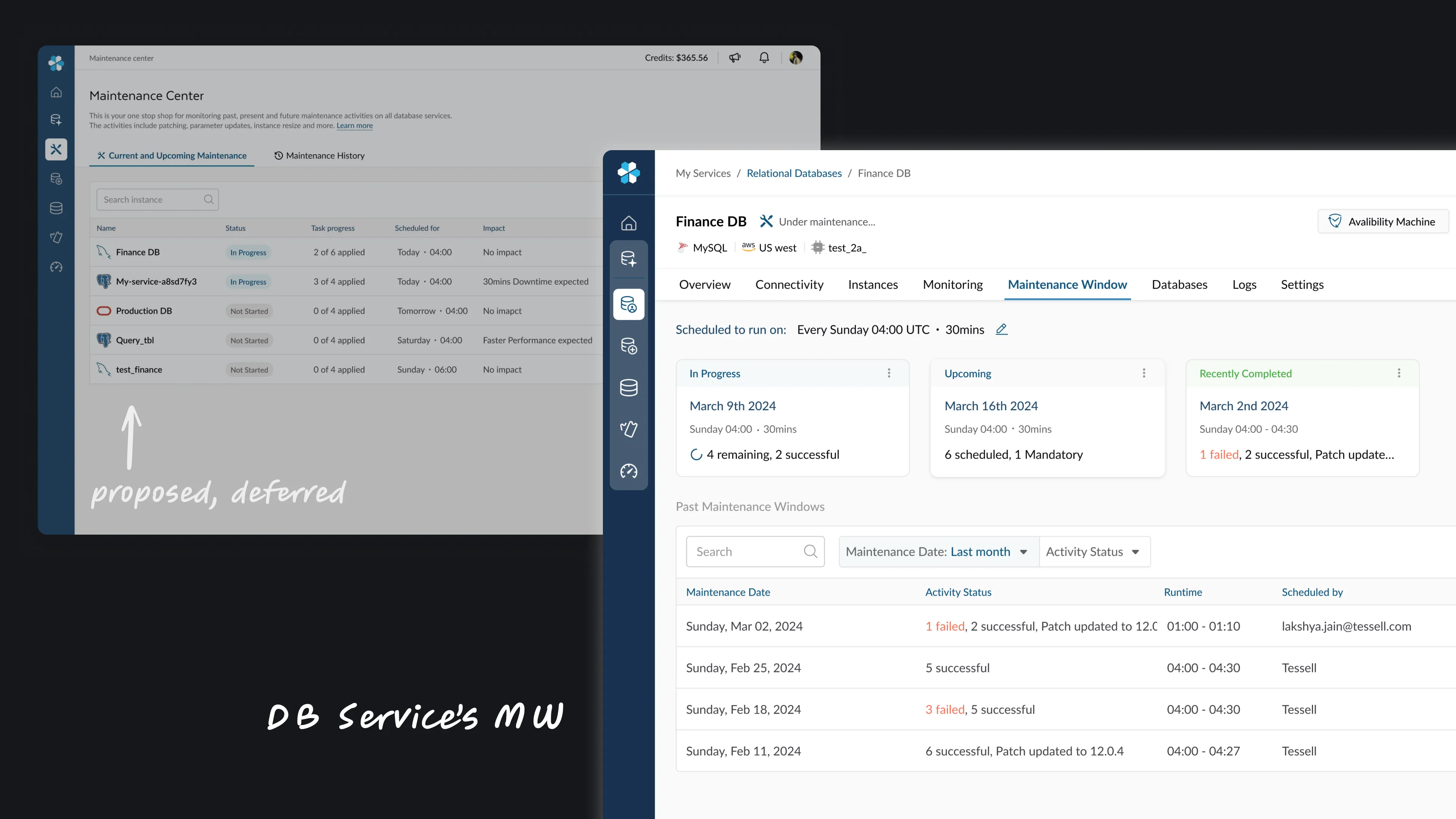
I proposed a Maintenance Center. We agreed it could wait.
Alongside the first windows, I proposed one central place to see scheduled maintenance. Engineering cut it from the release: there was only one meaningful kind of scheduled activity, the timeline was tight, and another product surface hadn’t earned its complexity yet. I agreed. What I did instead was design the window so a central view could plug into it later, and think about that view as something that could hold more than one kind of maintenance.
I could see where maintenance might need to go. The product hadn’t earned another surface yet.
05 · How I worked
Concept first, screens second.
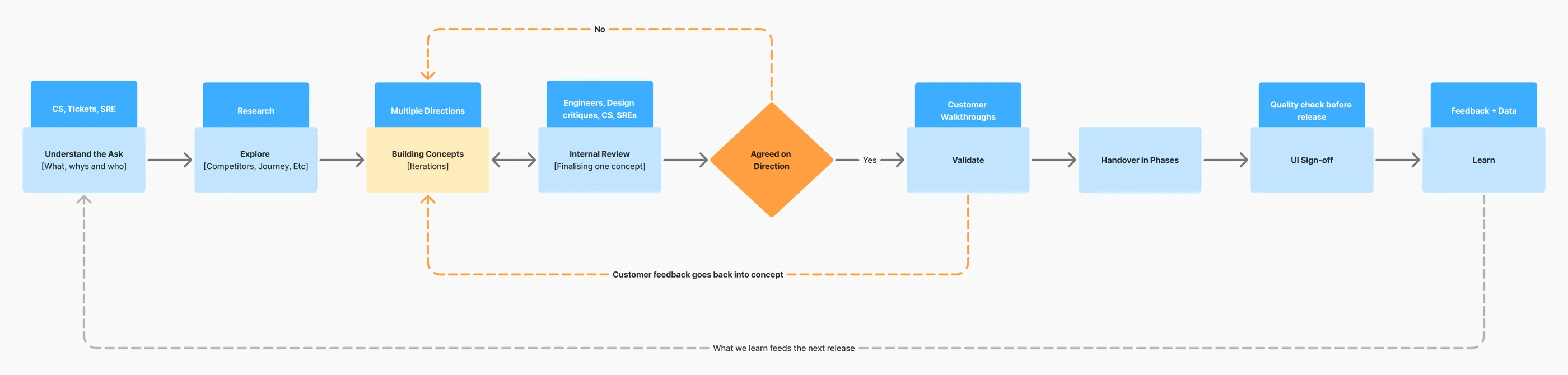
I shaped the requirements by turning early PRDs into quick concepts, stress-testing them with engineering, the support team and customer success, and taking the missing scenarios back to Product before committing to detailed design.
The same loop ran every release, and it sent me back to the concept more often than to the screens. Twice, I paused handoff when the model underneath the screens was still unresolved.
06 · Platform shift
2024 · The platform changed
Then the platform changed.
Three shifts moved downtime somewhere the first model couldn’t reach.
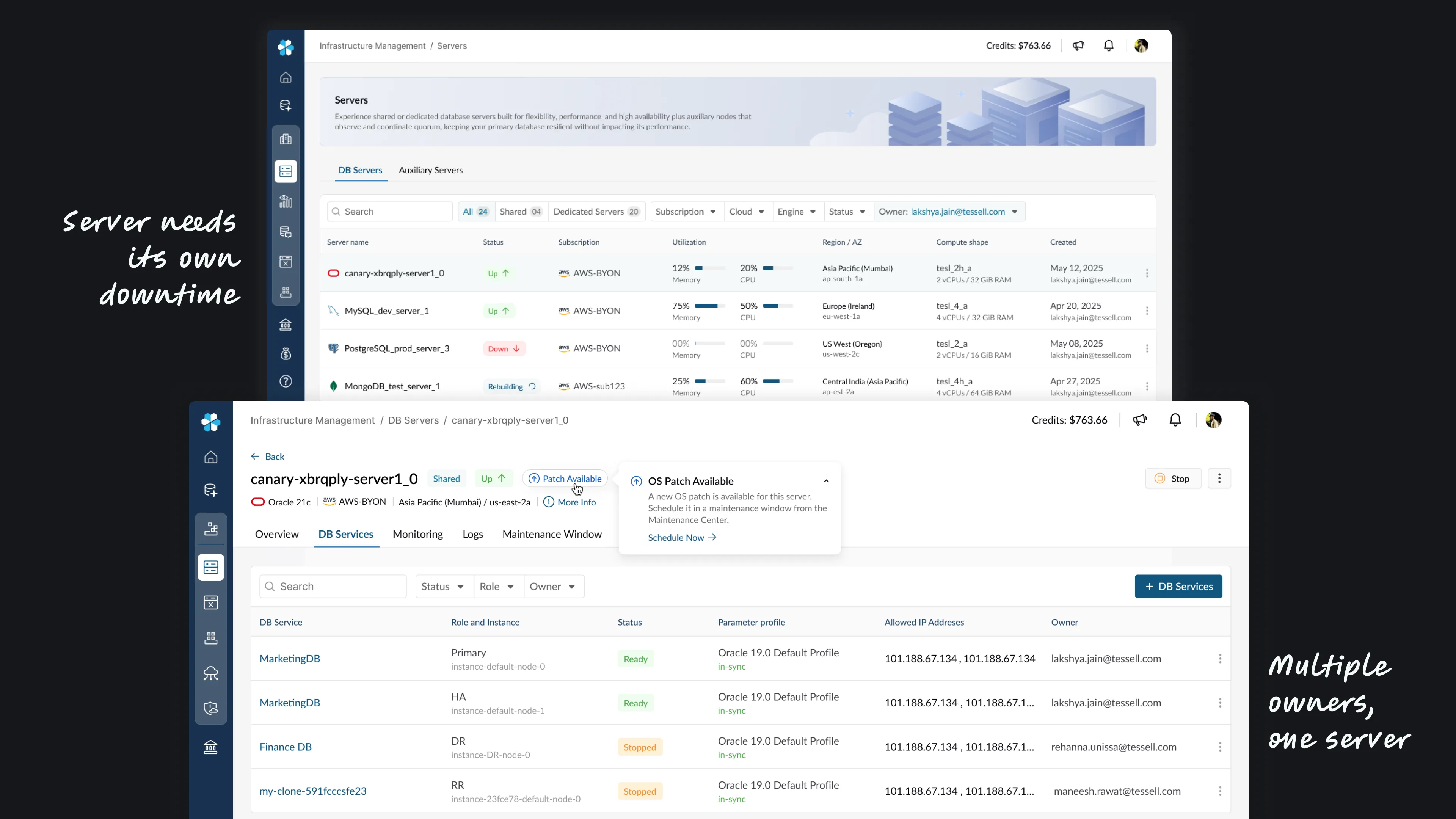
- Servers became part of the product
- Customers could now see and manage servers, and a new role appeared to run them, the infrastructure admin.
- One server, several databases
- Before, the relationship was simple. Now one server could support several database services, owned by different people.
- Servers needed downtime too
- Security updates are applied to the server itself. That was a second kind of maintenance, owned by whoever runs the infrastructure, and it could take down databases whose owners never chose it.
Think of a team renting an office. They know when their work can tolerate an interruption. But when the building needs rewiring, the building operator sets the schedule, and the tenants need to know. A database owner was now that tenant.
07 · Scaling maintenance
The workflow stopped scaling
Security updates ran on conversations.
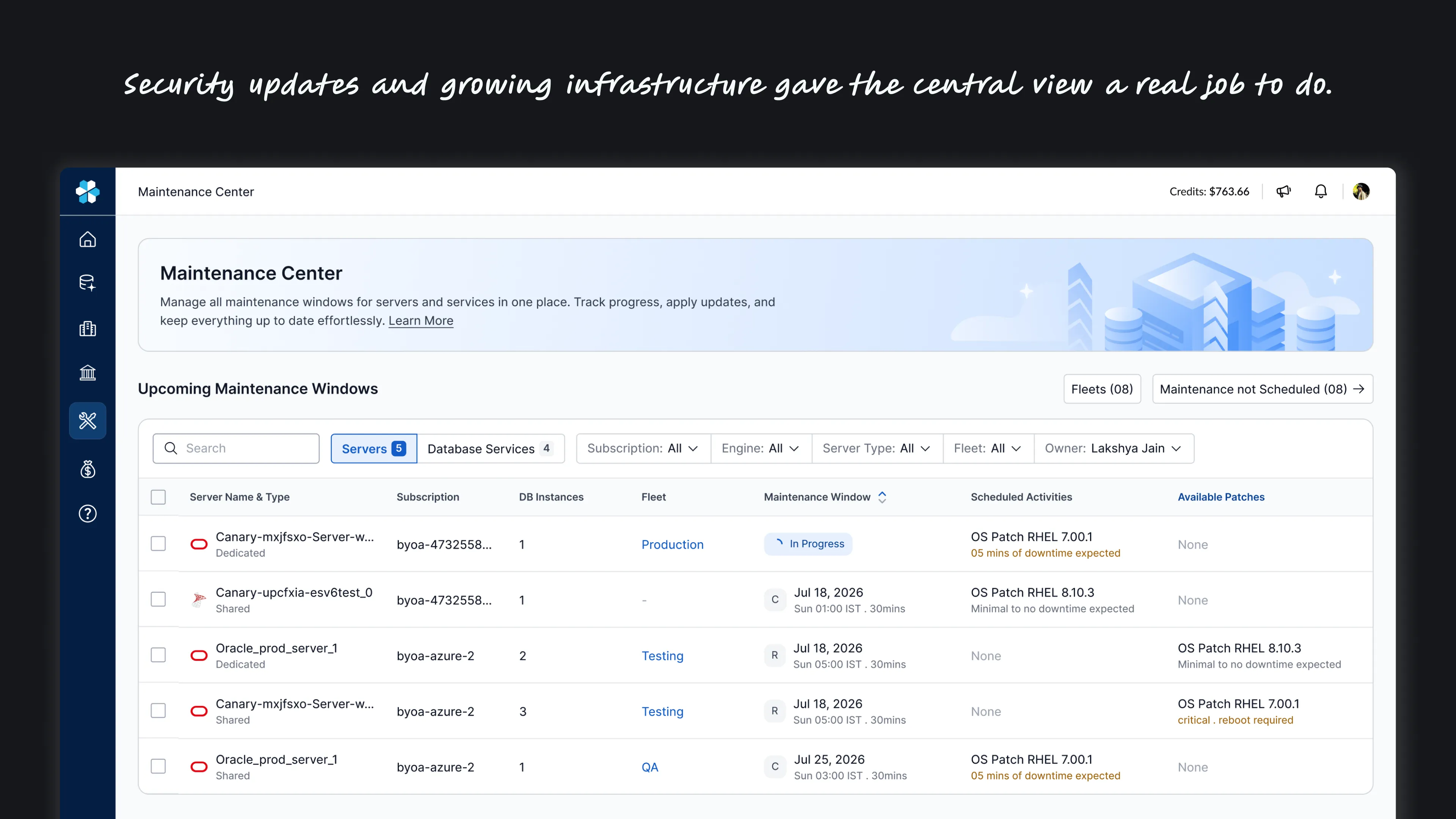
As customers and servers grew, every security update depended on people coordinating by hand.
Requests were scattered
Updates arrived as platform alerts, support tickets with spreadsheets of off-hours, and urgent asks. Nobody had one view of what was coming.
The support team did the work by hand
They agreed times over tickets and applied updates server by server.
Working out who was affected was manual
When a server went down, someone had to work out which databases went with it, and some servers could never be updated on their own.
It got harder with every customer
Effort grew with each server and each customer, and every new kind of maintenance would have meant another manual process.
The hard part wasn’t applying the update. It was coordinating everything around it.
08 · Maintenance Center
Maintenance Center returns
The idea from 2023 finally had a reason to exist.
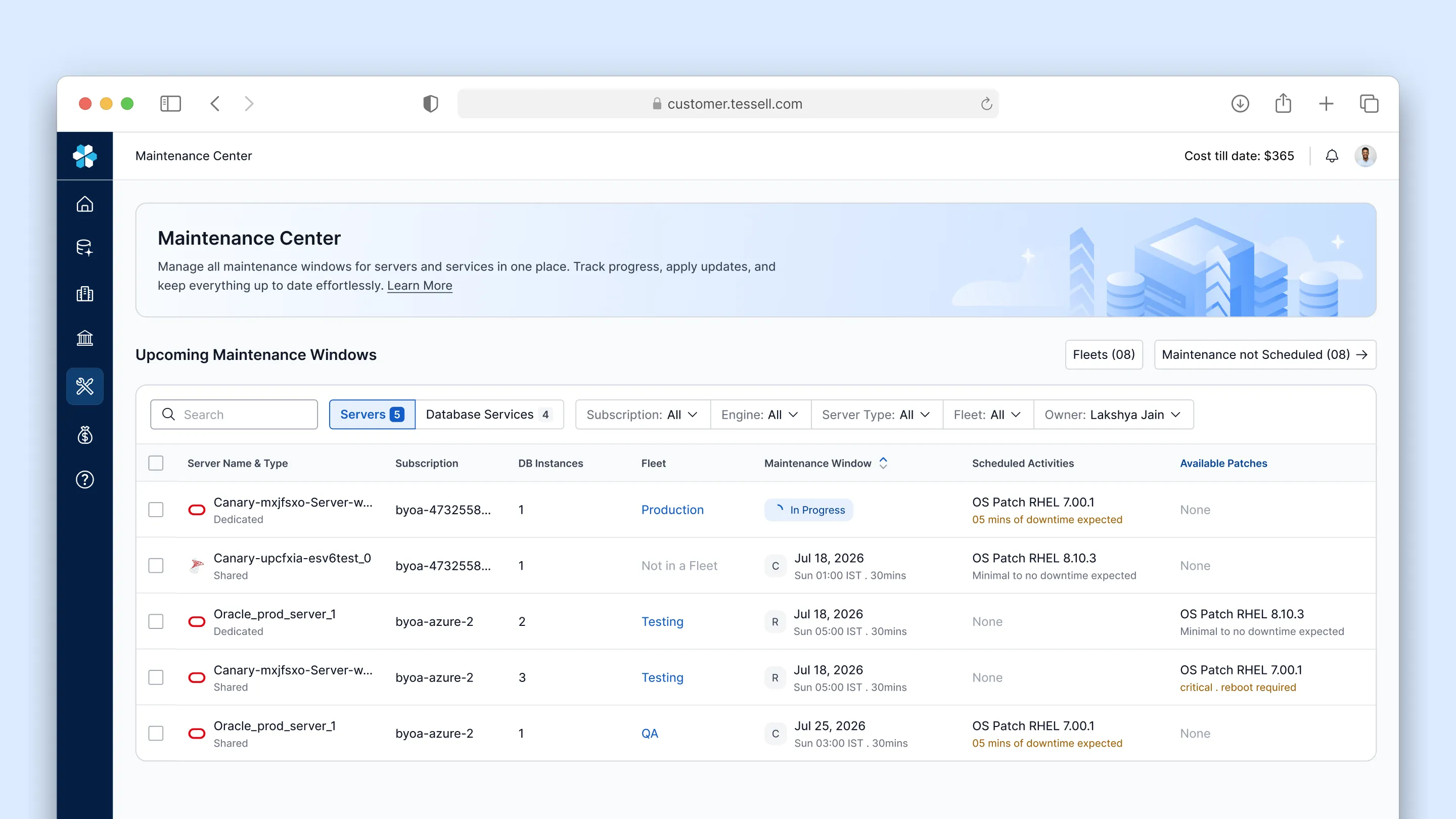
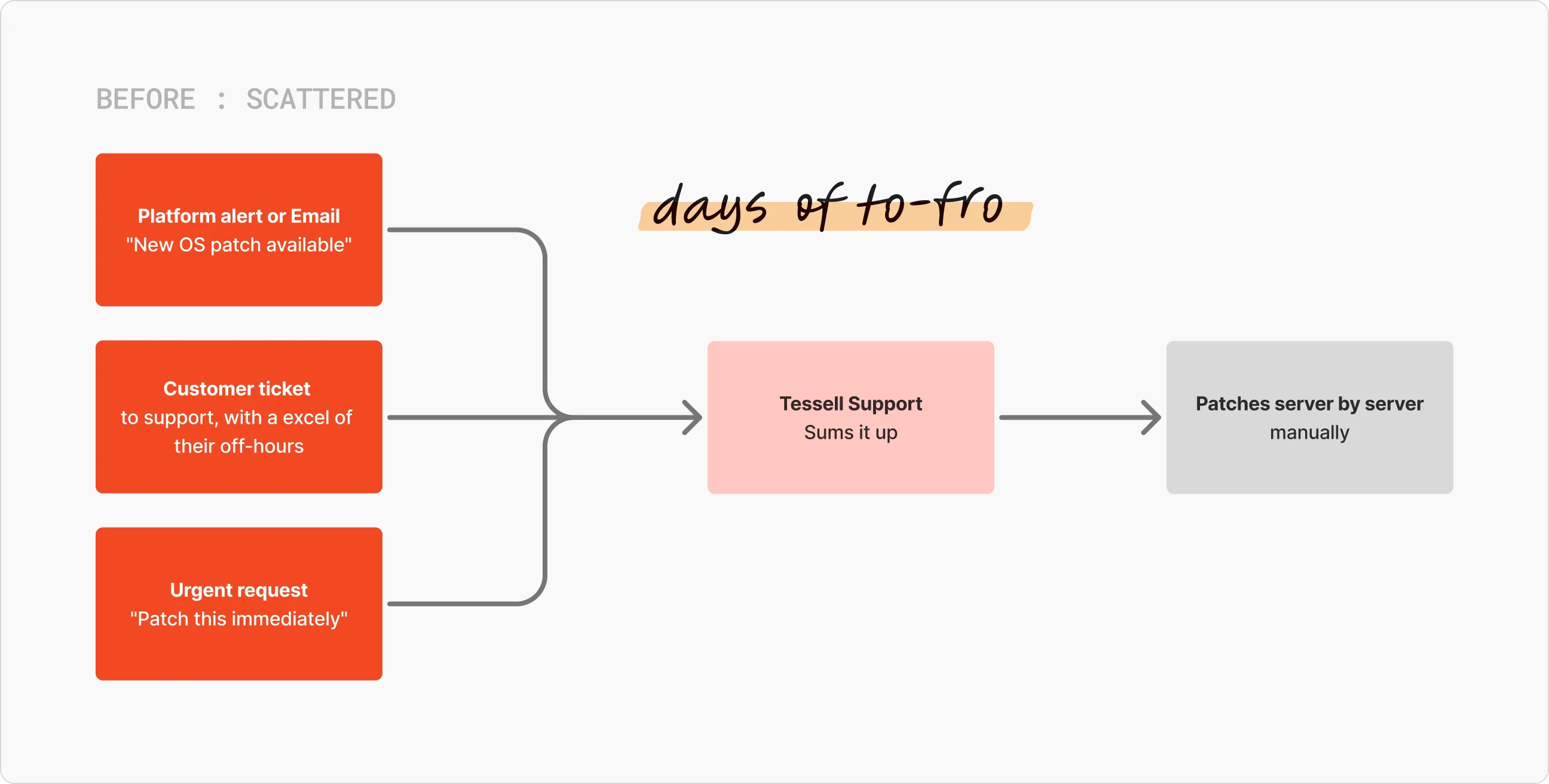
I had proposed a central maintenance view alongside the first database windows. We deferred it because one kind of scheduled work didn’t justify another surface. By the time security updates arrived, that had changed: more kinds of scheduled work, many servers, several databases behind each one, and far more upcoming maintenance to keep track of.
Maintenance could no longer live only on the resource being maintained. Because the window model had been designed with a central view in mind, we brought the Maintenance Center back without reinventing it.
- Question
- What does someone need to act on now? Every view answers three questions in order: is an update available, is it scheduled, and when.
- Tried
- Showing every generated window for each recurring schedule.
- What I learned
- With real data, the same database appeared three times, two of them empty. The repeats buried the one row that mattered.
- Decision
- Show only the next window per schedule; one-off windows all show.
- Why
- The view exists to help someone act, not to reproduce a calendar.
Failure shouldn’t look like completion
Early on, a failed update disappeared from the database page while the activity feed showed the failure, so disappearing read as success. The support team caught it. I kept the update visible until it succeeds, with the next action alongside it.
09 · Scheduling
Customers changed the scheduling model
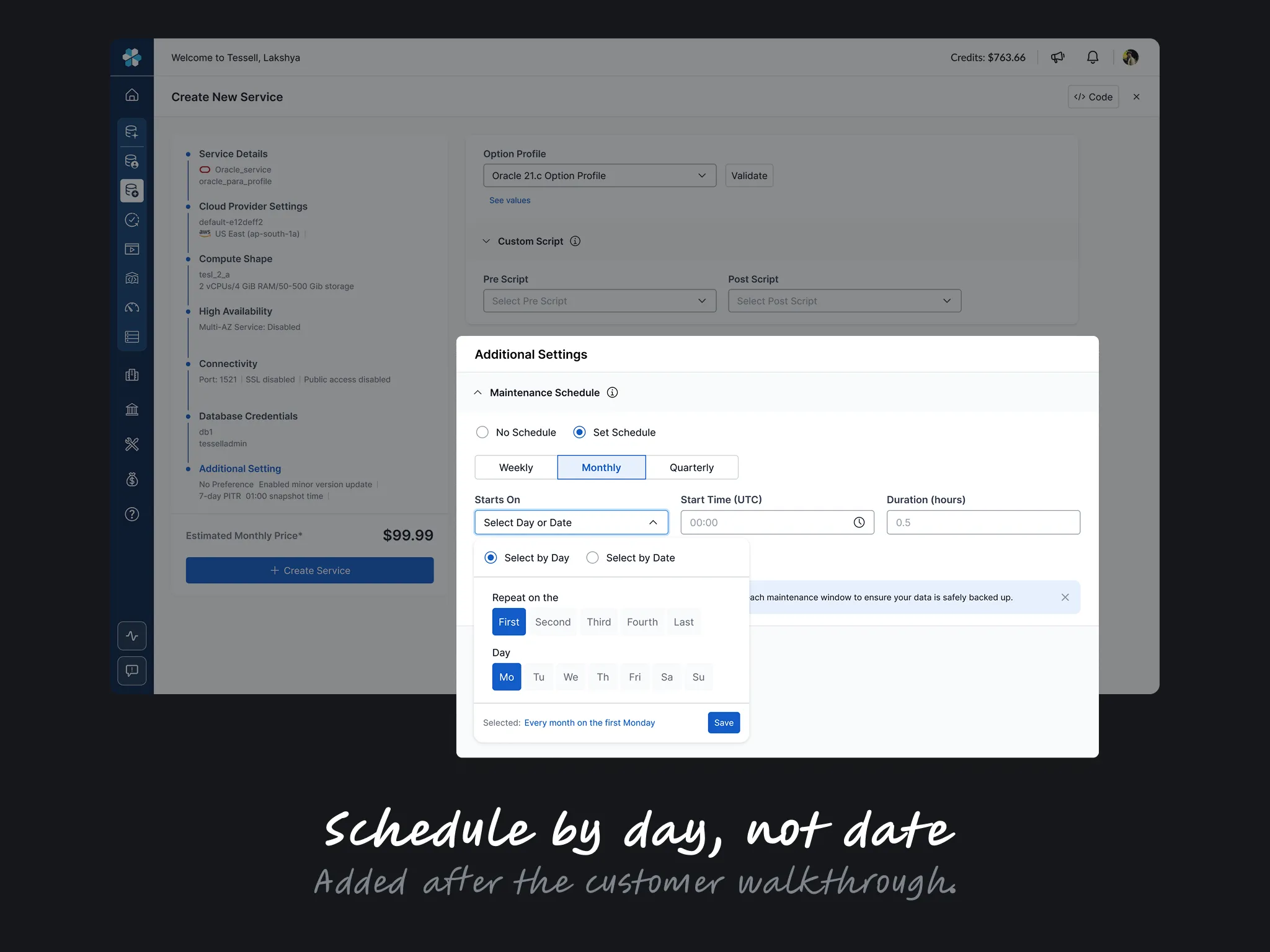
Customers didn’t think in dates.
- Question
- How should people set a recurring maintenance window?
- Considering
- A date-based picker. The first version only knew dates.
- What I learned
- I validated the design with three enterprise customers. In a walkthrough, one told us their maintenance cycle runs on “the first Thursday”, not the 25th. Their windows followed team routines, not the calendar.
- Decision
- Rebuild the picker around how people say schedules: cadence, then first to last, then a weekday, then a time, read back in plain words before saving.
- Why
- An ordinal day never drifts across the week from month to month, and the read-back is what people check before committing.
10 · Fleets
Operating maintenance at scale
Some servers couldn’t move independently.
Admins don’t update servers one at a time. They already kept groups in their heads, like “all production, first Sunday”, and rebuilt those lists every cycle.
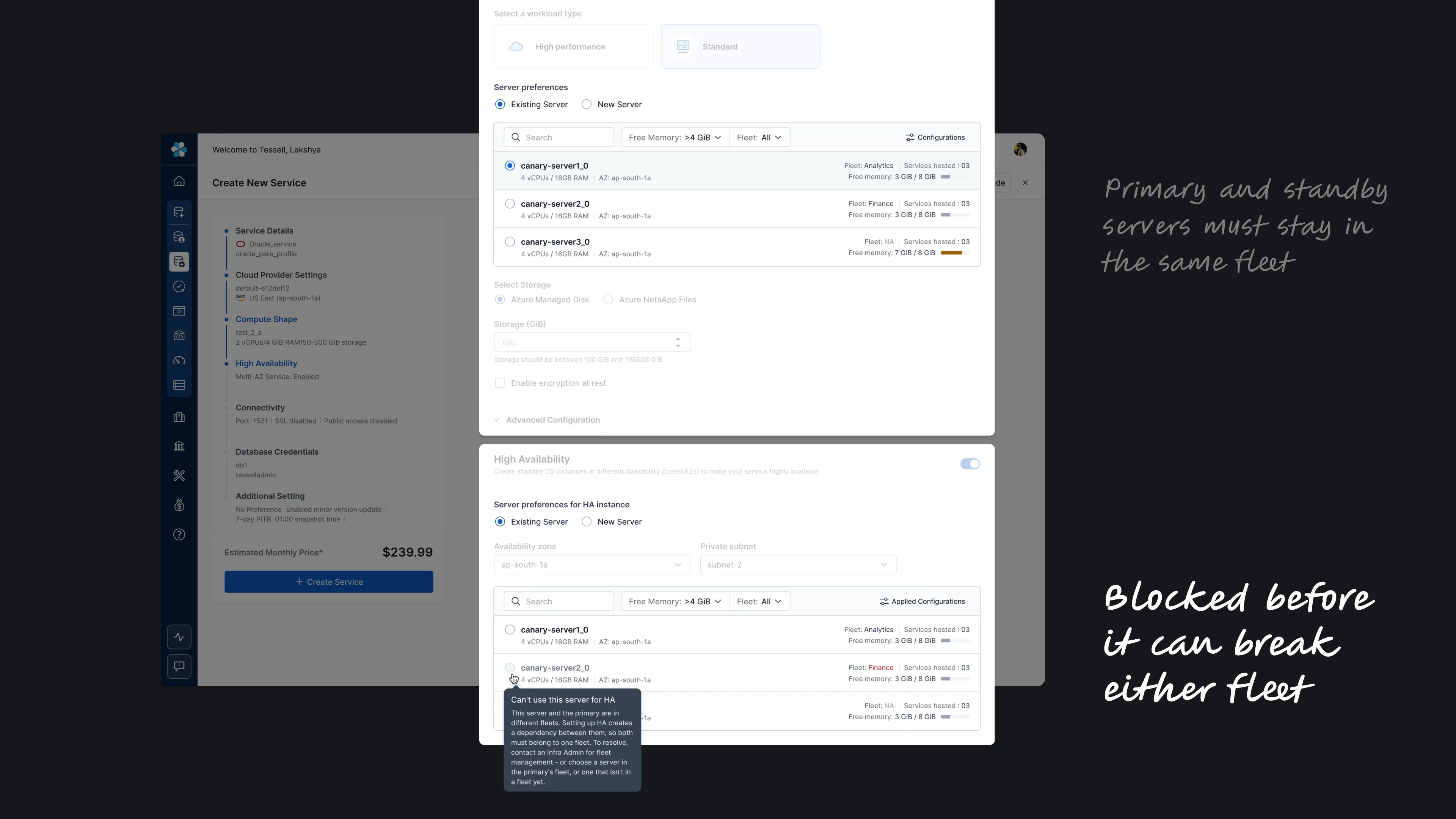
But certain servers can’t be updated separately. If one is in a recurring schedule, the servers tied to it have to stay with it; internally we called these dependency groups. The product already knew which servers were tied, so I kept them together at the moment of choosing, rather than allowing an invalid setup and showing an error afterwards.
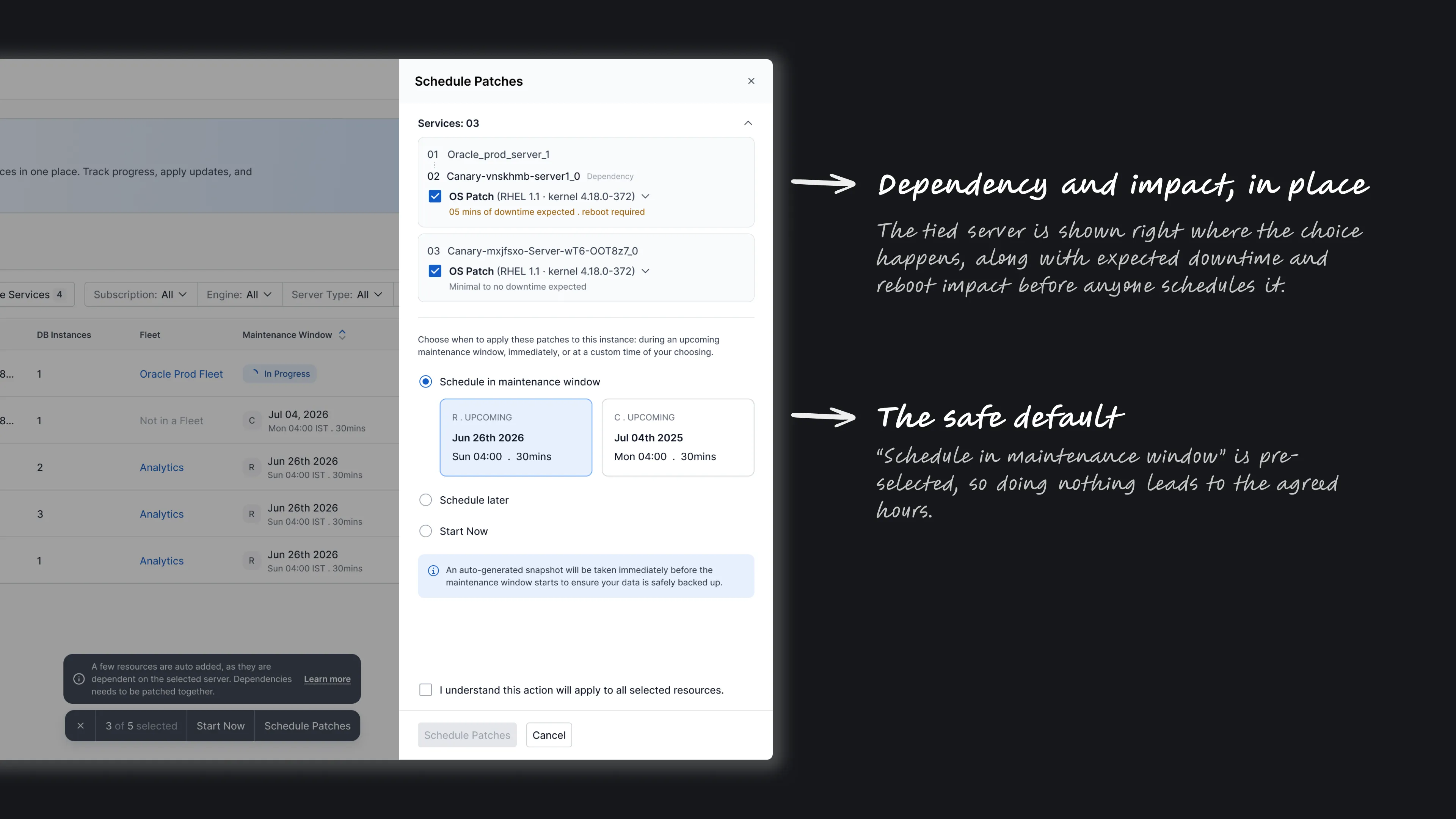
What must move together sits inside what an admin chooses to run together.
A fleet is the set of servers an infrastructure admin chooses to manage together, like “all production”. A fleet always contains whole groups of servers that must update together, and a group can never be split across two fleets.
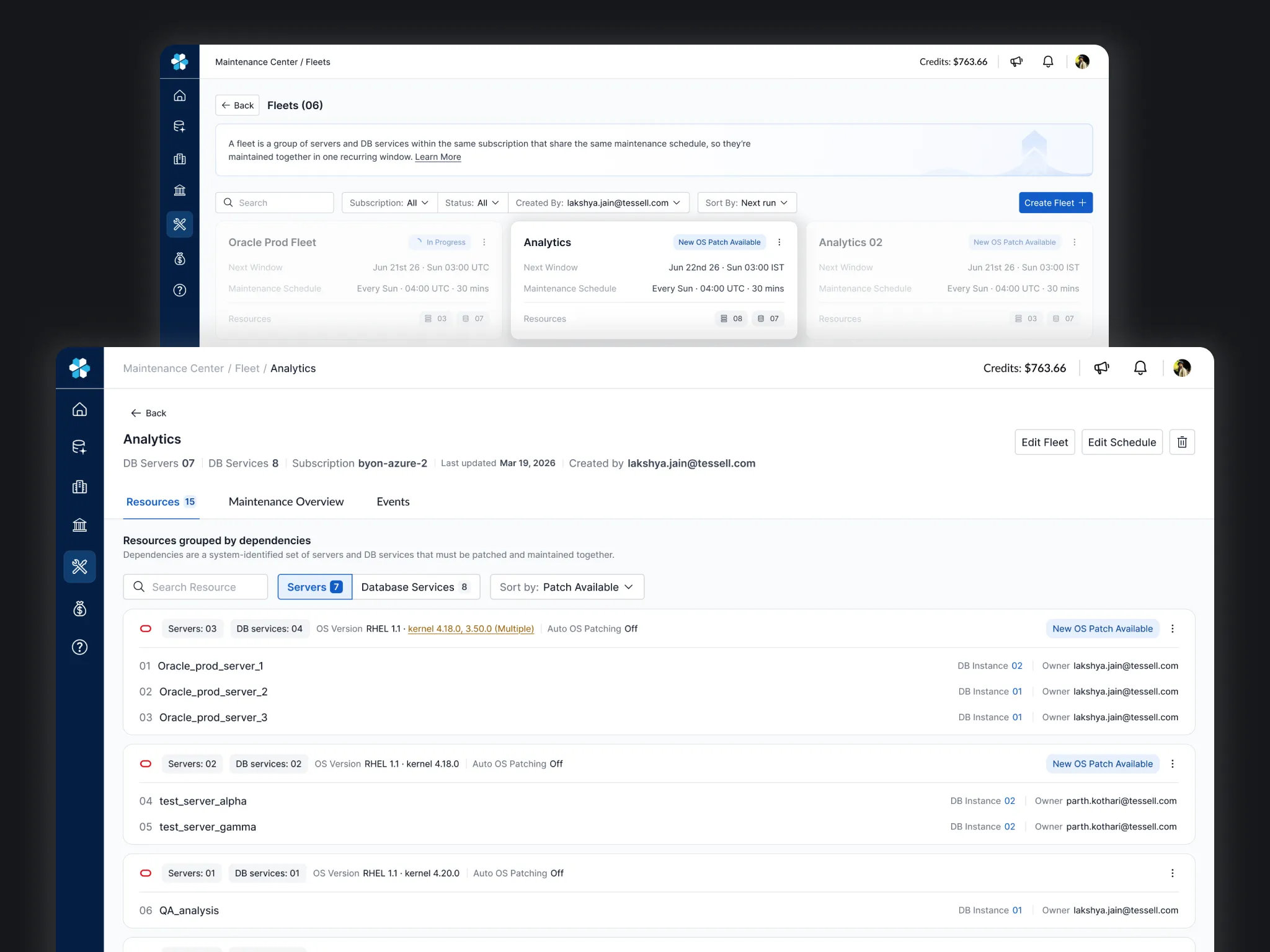
I paused handoff over a rule that could break two fleets.
Some database actions could tie together servers that belonged to two different fleets. The PM leaned towards allowing it, so the database workflow stayed flexible. Engineering and I objected: one database owner’s action could silently disrupt the recurring schedules of two fleets that infrastructure admins had set up.
The screens were ready to move, but the rule underneath them wasn’t, so I paused handoff in writing until we agreed what the system should protect. The alignment discussion surfaced several possible scheduling combinations, and instead of designing each one, we reduced them to one rule: a fleet always has one recurring schedule, at server level.
- Proposal
- Allow the database action across two fleets.
- Concern
- One person’s action could silently disrupt recurring schedules that two infrastructure admins had set up.
- Evidence
- I took the scenario to the head of customer success. Setting up a fleet can take an admin about a week, fleet boundaries often follow who has access to what, and a database owner often can’t even see the servers in another fleet.
- Decision
- Block the cross-fleet action and explain the conflict before anything changes, with the same rule in the portal, API and Terraform.
11 · Outcomes
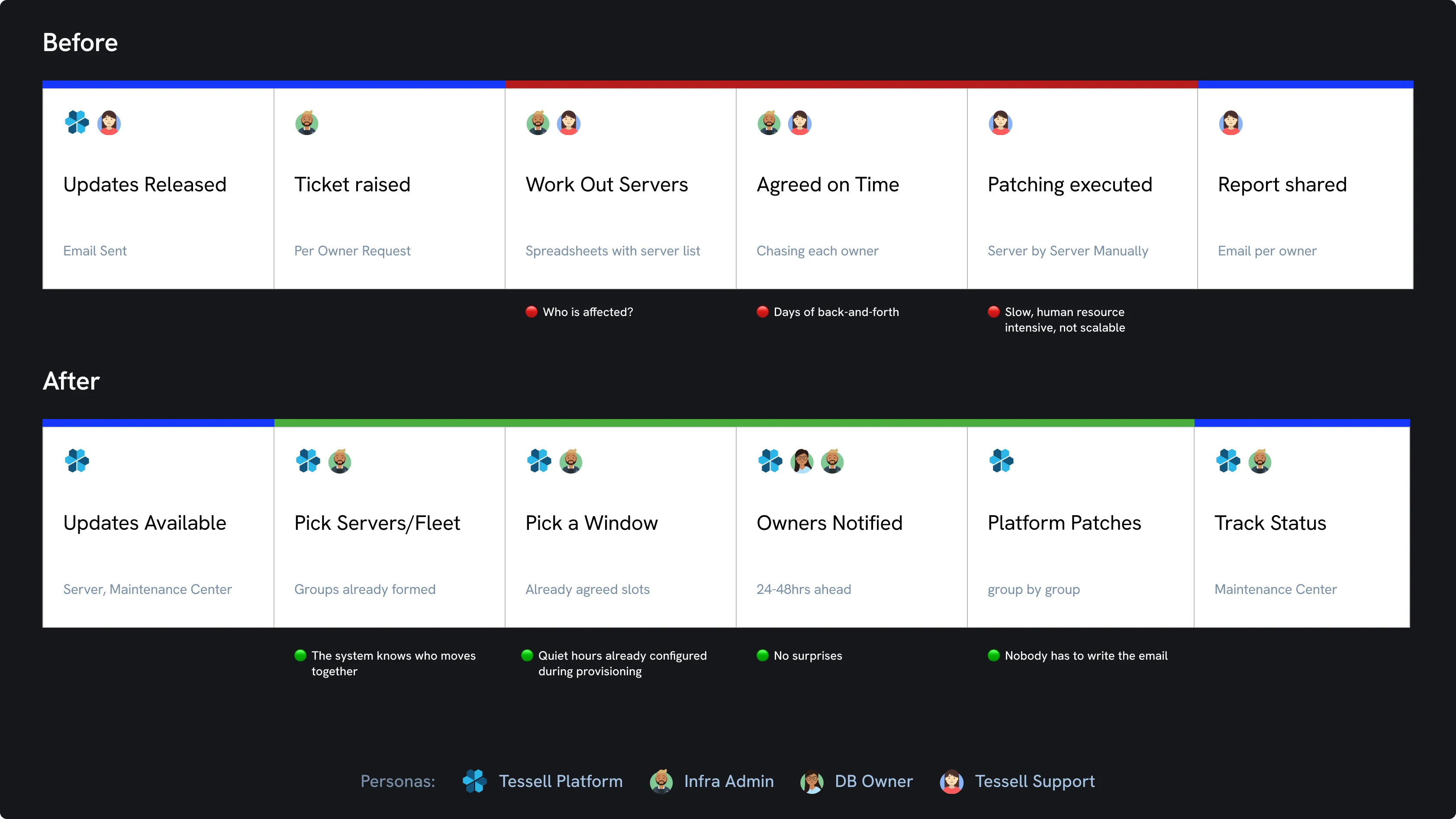
What changed in practice
The coordination moved out of people’s heads.
I don’t have hard numbers I can share, so this is the change in the workflow, with what shipped kept apart from what was designed.
12 · Ownership
Three years of ownership
What owning one concept for three years taught me.
I shaped the problem before polishing the UI
I turned early requirements into quick concepts, tested them with the people involved, and took missing scenarios back to Product.
I knew when complexity could wait
I proposed the Maintenance Center in 2023 and agreed to defer it, because the product hadn’t earned it yet. I kept the path open, and it came back when it had.
I knew when ambiguity couldn’t wait
Twice, I paused handoff when the model underneath the screens was unresolved. On fleets, that hold turned an open cross-fleet question into one clear rule: a fleet always has one recurring schedule.
I used evidence to challenge direction
On cross-fleet actions, I disagreed with the PM’s direction, brought in customer success evidence, and the product rule changed.
Along the way I mentored the designer who built the UI until he ran handovers himself, introduced decision records so settled questions stayed settled, and set up an observation log with the support team that turned field issues into release work.
What I’d do earlier next time
- Validate earlier
- The scheduling model changed because of a customer walkthrough. I’d put concepts in front of customers before the first internal review, not after.
- Map edge cases first
- The fleet design hold happened because basic questions surfaced late. I’d hunt for those before designing, not when work stops.
- Test with real data
- The Maintenance Center looked clean until real data listed one database three times. Shared views need realistic data before launch.
The full story
There’s a lot more behind this.
The detailed decisions, trade-offs and real screens are covered by NDA. I’m happy to walk through them in a conversation.